 CodeCharge Studio
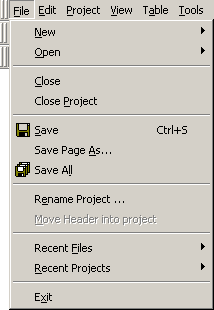
Many of the commands available on the Menu bar can be assessed using keyboard keys rather than using the mouse. This is done by using combination keys that map to particular menu options. Looking at the Menu bar options, notice that each of them has a single letter underlined. Holding down the Alt keyboard key then typing the underlined letter has the same effect as clicking on the menu option concerned. For instance, typing the Alt-F keys will open the File menu shown below.
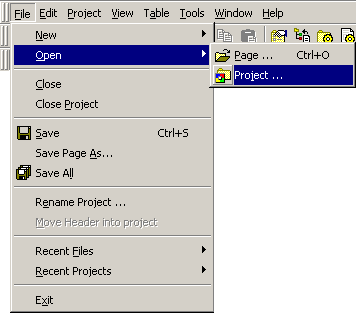
Notice that within the menu option, some of the sub-options also have underlined letters too. You can navigate further to these sub-options by simply pressing the underlined letter. For instance, within the File menu, you can open a page by pressing the O key followed by P.
Some of the sub-options under the Edit menu are unique in that they can be accessed directly without first opening the Edit menu option.
These are commands that are very frequently used when working with documents and as such, they have dedicated access keys that are not only used within CodeCharge Studio but would also be found in most windows applications. The commands are as follows:
| Command | Key Combination |
|---|---|
| File | |
| New Page | Ctrl + N |
| Open Page | Ctrl + O |
| Save | Ctrl + S |
| Edit | |
| Undo | Ctrl + Z |
| Redo | Ctrl + Shift + Z |
| Cut | Ctrl + X |
| Copy | Ctrl + C |
| Paste | Ctrl + P |
| Select All | Ctrl + A |
| Find ... | Ctrl + F |
| Find Next | F3 |
| Find in Files | Ctrl + Shift + F |
| Replace ... | Ctrl + H |
| Replace in Files | Ctrl + Shift + H |
| Go to ... | Ctrl + G |
| Project | |
| Publish Project | F9 |
| Publish Page | F8 |
| Quick Publish Page | Ctrl + F8 |
| Live Page | F10 |
| Quick Live Page | Ctrl + F10 |
| Live Page in Browser | Shift + F10 |
| Quick Live Page in Browser | Ctrl + Shift + F10 |
| Home Page | F7 |
| Home Page in Browser | Shift + F7 |
| Table | |
| Move Column Left | Alt + Left |
| Move Column Right | Alt + Right |
| Move Row Up | Alt + Up |
| Move Row Down | Alt + Down |
| Help | |
| Help Topics | F1 |
Committing these keys to memory could significantly improve the efficiency with which you edit documents.